
User Guide
A flexible tool designed to simplify and streamline cart shift scheduling.
✅ App Features
- 📱 Best experienced on desktop, but fully mobile and tablet friendly. Take your app with you!
- 📍 Schedule up to 4 cart locations per shift (A–D)
- ⏰ Choose shift rotation durations (15, 20, 30, 45 or 60 minutes)
- 🕑 Set your own start and end times
- 👨💼 Specify if a brother is required at a location
- 🔁 Auto-generate schedules, or refine them manually
- ✎️ Edit individual assignments for flexibility
- 🎨 Toggle color-blocked shifts with the paintbrush icon
- 🧠 Prevents back-to-back assignments by default (overridable)
- 👥 Ensures publisher pairings are varied (overridable)
- 💾 Save & reuse shifts, rename and upload for future use
- 📄 Export to PDF or CSV
- 📝 Includes a Shift Summary showing total shifts assigned per publisher
📝 How to Use the App
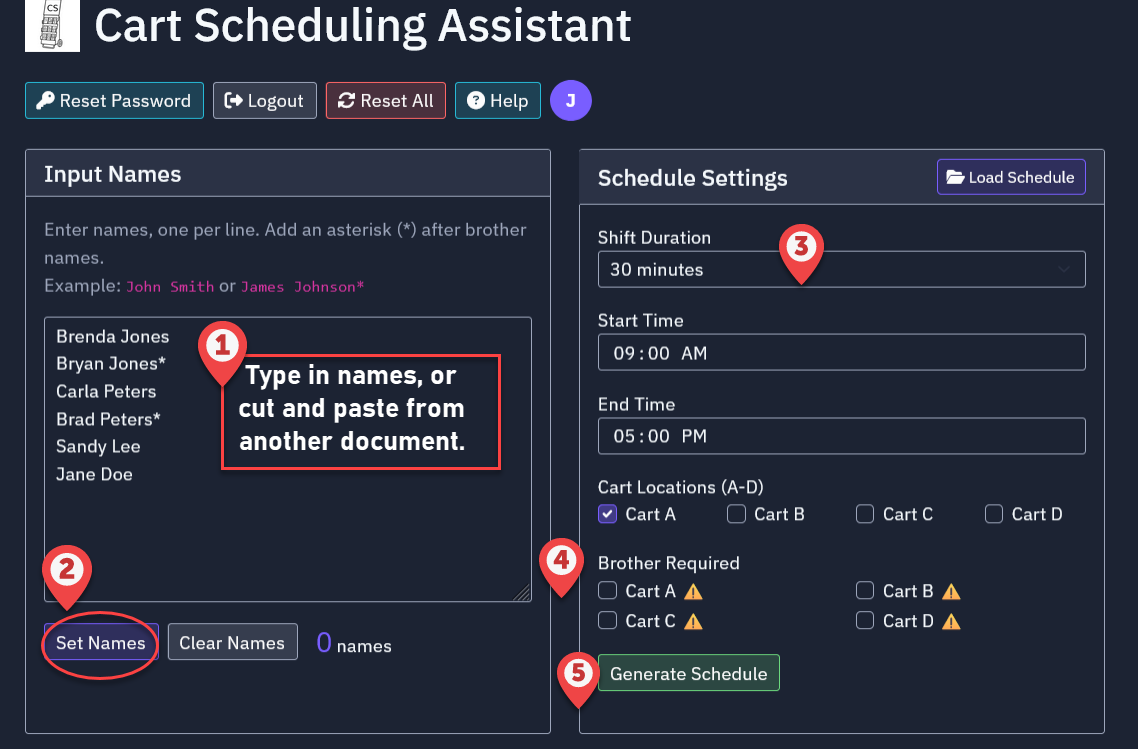
- Enter Names (type in or cut & paste) in the “Input Names” window (left panel).
- To identify brothers, add an asterisk (e.g., John Jones*) — #only needed if you want the app to always assign at least one brother to a particular cart location.
- Click “Set Names” (Very important...after any edit to names!)
- In the “Schedule Settings” section:
- Select shift duration (15, 20, 30, 45 or 60 Min. options)
- Enter start and end times
- Choose which carts are active (A, B, C, D)
- Specify if a brother is required at a cart # This will only work if you have placed asterisks behind the names of brothers in your list (e.g., John Jones*)
- Click “Generate Schedule” Not happy with the layout? Click again or use “Edit” for custom changes
- It doesn't matter if you enter names in lower case, or all caps -- The system will convert them to proper case when the schedule is generated (e.g., jane jones → Jane Jones).
✎️ Manual Editing (Optional)
- Click the “Edit” button to override assignments
- When in edit mode, the schedule border will turn bright blue, and a pencil icon will appear next to each name.
- Click a name to manually edit it
- The system warns of back-to-back violations (or if you have indicated that a brother needs to be on a cart, but are trying to select a sister)-- but it still allows your changes
- Click “Done Editing” when finished
In EDIT MODE-- Bright blue border and pencil icons next to names. Double click on a name to modify.
✎️ Cart Naming (Optional)
- Give your carts more relevent names if desired.
- Click the pencil icon next to the cart header and enter a new name.
- The new name is only for the current schedule. Schedule will default back to Cart A, etc.
- Keep names relatively brief (see example).
📈 Shift Summary
The Shift Summary shows how many shifts each publisher is assigned. This helps you balance the schedule by seeing who's over- or under-scheduled.
💾 Saving & Reusing Shifts
- Start with a previous schedule — no need to start from scratch. This is useful if you have a typical group of publishers on particular days and locations.
- Save your schedule under a name like “Tuesday at CSU”
- Upload it later to reuse the structure
- All names will re-populate and you can modify names without starting over
- If you have modified the list, click "Set Names" button.
➕ Add Shortcut to Mobile/Tablet Home Screen
📱 Android
- Open Chrome or Edge.
- Go to: cartshifts.com
- Tap the three-dot menu (⋮) in the top-right.
- Select “Add to Home screen”.
- Rename if needed, then tap Add.
- Choose “Add” again or drag the icon to place it manually.
🍎 iPhone / iPad
- Open Safari.
- Visit: cartshifts.com
- Tap the Share icon (📤 — square with up arrow).
- Scroll down and tap “Add to Home Screen”.
- Edit the name if desired, then tap Add.
Usage & Terms Agreement
This app was created out of love, and we hope it proves useful to you. ❤
We hope you share the app link with others that may find it useful.
Please note this is not freeware All coding and content is proprietary. We do incur costs associated with hosting and maintaining this application.
Registration fee is currently $12.99 per year. Prior to the end of one year you will receive an email asking if you would like to continue use of the app and request a fee payment for the subsequent year. Any schedules you have already entered will still be available to you.
If you are a Special Pioneer, Bethelite or Missionary -- please contact us, we will set you up with a complimentary account.
💭 Have questions or need further help?
Email us at ct@cartshifts.com